A baby-movement journal
for iPhone & Apple Watch.
I shaped the product experience and art direction for Quickening: how people choose a counting method, record a movement, review their history and make the experience their own. I worked with AI-assisted development to turn those decisions into a working product.
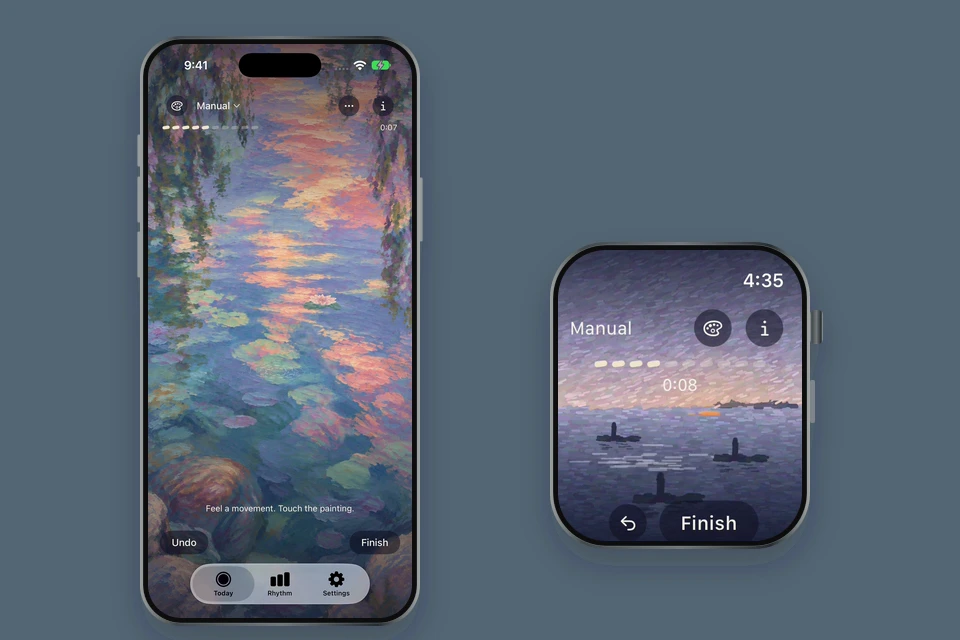
Keep the act of recording quiet and simple, while making the counting rules, feedback and next action understandable.
Product choices, interaction design, visual direction and implementation review—across the recording flow and the services around it.
Quiet to use.
Clear about what it records.
I wanted the painting to be the place where someone records a movement, with a small amount of interface around it. That meant making deliberate choices about what stays visible, what belongs in a separate view and when a next step needs attention.
The calmer surface still had to explain real differences: a tap can count individually or be grouped with nearby taps; reaching ten opens a review; a record is only saved after confirmation. The interaction work focused on making those distinctions understandable.
A continuous canvas, compact controls and feedback tied to the recorded input.
Explicit choices, an accessible review and a history that preserves context.
One painting,
from the first tap to review.
I asked for the idle and counting states to share the same canvas. The first tap starts the timer and records movement one, without changing the scene’s frame.
- 01
Start in place
Touch the painting to begin. Controls and navigation sit outside the counting area, so moving between tabs does not add a movement.
- 02
Keep correction close
Undo remains available, including for an accidental tenth movement before saving.
- 03
Show what happens next
The compact result panel opens automatically. Save, Note and Discard are visible, and the panel can be hidden to enjoy the painting.
Manual mode, demonstration taps, original speed.
Different rules need
an explicit choice.
The research review surfaced different approaches to movement recording. I chose to retain the original grouping behaviour and offer a separate manual option, then simplified the setup into two steps: make it personal, and choose a counting style.
The current interface uses short names and explanations. The fuller instructions and sources stay within reach in the information sheet. Language and region do not silently choose a method for the user.
Nearby taps
are grouped.
Each tap restarts a rolling 20-second interval. A grouped tap receives a brief explanation instead of silently appearing to do nothing.
The interval is Quickening’s product rule; it has not been clinically validated.Each intentional tap
is recorded separately.
The person decides what counts as one distinct movement. There is no minimum interval between separate intentional taps.
Both styles retain their identity in saved records.The external guidance informed the review; it does not endorse Quickening. Count the Kicks NHS
A scene that responds
to the person recording.
For Rose, I pushed the early pond studies towards more visible brushwork, dreamlike colour and a gradual shift from daylight to dusk. The interaction needed the same care: a fish floating above the water, or rotating as one rigid shape, broke the scene.
My feedback focused on depth, water interaction and natural movement. When the browser study became a distraction, I moved the work into native iOS so the decisions could be judged in the platform people would actually use.
Paid scene unlocked with a local test purchase.
A response to the touch.
Ripples begin where the person taps. New counted movements can trigger a passing fish; grouped taps do not advance the scene’s progress.
Three moments of change.
At counts 3, 6 and 10, the light changes over five seconds and another lily emerges. I asked for a slower, subtler transition that preserves the painting’s character.
Motion remains optional.
Reduce Motion presents still stages. Leaving the scene pauses its animation, and Undo returns to the preceding stage.
A useful record
after the moment has passed.
History with a readable rhythm
I chose a seven-day view that can move backwards through earlier weeks. Multiple records on the same day remain separate; empty days remain visible.
Method colours and text labels keep the counting styles identifiable. Different styles are not averaged together. Other records remain in the list, and the export retains method and timing details.
The design keeps recorded observations legible without turning them into a health assessment.
The chart is a layout example, not real usage or a clinical trend.
Harbour and Fireflies are available on Watch.
The same idea, at the wrist
The Watch carries the painted counting experience into a smaller space, with compact controls for recording, review and saving.
The device that starts a session owns its save. Phone and Watch retain separate histories, so this demo shows a complete independent Watch session. It does not stand in for a cross-device synchronization test.
Protect the task
around the interface, too.
Keep the journal local.
Personal records and profile details stay on the device, with no Quickening account required. The user can choose to export a PDF. The advertising integration has separate technical-data disclosures; journal details are not passed to it.
Save comes first.
I chose a low-frequency, post-save advertising format and a one-time Rose purchase that also removes ads. Counting and the unsaved result remain ad-free; an unavailable ad never delays saving.
The current candidate uses a third-save opportunity and a rolling daily cap. These are implementation safeguards, with no live experiment or revenue result claimed.
From product decisions
to a working experience.
The iPhone app is in internal TestFlight, with a working Apple Watch companion. Counting, review, history and scene selection are implemented; public-release evaluation is still ahead.
Native phone and Watch counting, review and saving; weekly phone history; scene selection and a paid Rose experience.
Simulator walkthroughs and targeted implementation checks, alongside my own device feedback. TestFlight purchase, reopening and restore have passed my checks.
These demonstrate a functioning product and specific interactions. They do not establish broader usability, retention or health outcomes.

I directed the product choices, flows, visual identity and scene behaviour, and reviewed the implementation through working builds. AI tools supported development, technical testing and artwork exploration. The selected Held identity and Rose direction reflect my choices across those iterations.